From the archive
The Machine Learning Inner Loop
On this page
The "Inner Loop"
The term "Inner Loop" first appeared publicly in Mitch Denny's blog post The Inner Loop. It refers to the development life cycle – code, build and test. According to Mitch, the Inner Loop is the cycle on your development machine. It is the cycle that you go through when you are doing your development. You start with writing some code, then you run your build on your computer and test your changes locally. This cycle can be slightly different from technology stack to technology stack, but combining the different steps in the loop gives you the minimum amount of work you need to implement a feature or fix a bug.
In the article, Mitch mentioned the importance of keeping this loop as short as possible. If you can make changes quickly, build your changes quickly, and test your changes quickly on your computer, you have the potential of being very productive. Anything in this Loop that is not optimised should be optimised, because it could affect multiple team members for every change they are about to make.
Workflow in Machine Learning
Machine Learning, which is based on data science, is a relatively new domain of computer science, and the ecosystem is relatively young and less mature compared to software engineering. Traditionally, data science workflows were mostly limited to interactive Python notebooks or R scripts, with the results published as research papers. In other words, there was not much "workflow" involved. With the rise of Big Data, machine learning and artificial intelligence in the real world, however, the requirement to be able to quickly iterate on models and have reliable code running in production pipelines is clearer than ever before.
In a typical Machine Learning project, data engineers and data scientists will generally go through the following phases on their computers:
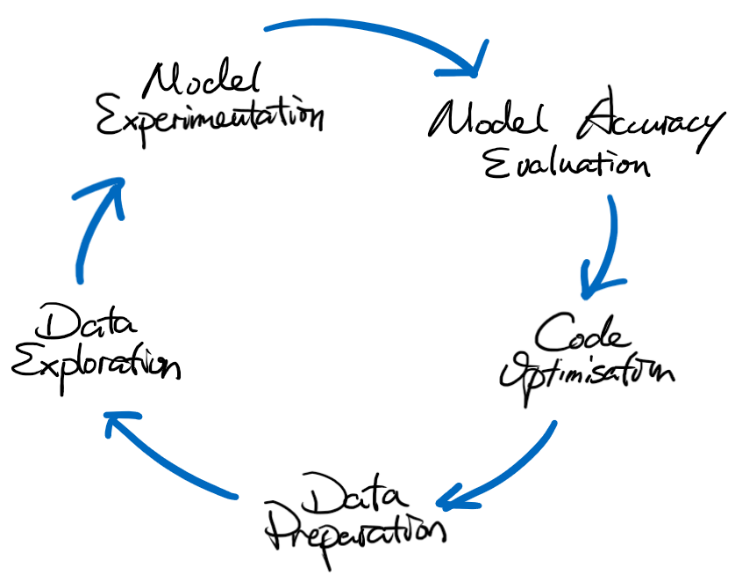
Here is a detailed explanation of what is involved in each step:
- Data Preparation : This step is for data engineers to prepare the data for exploration and model experimentation. This is normally done in an interactive Python notebook (e.g. Jupyter Notebook, Databricks Workspace), and at this stage there won't be much code quality implementation like unit testing or linting.
- Data Exploration & Model Experimentation : These steps are normally completed by data scientists. They are the heavy-lifting part of the process which defines how the data will be extracted into features, how the features can be used to train models, and what parameters are to be used during the training process. Like the previous step, they are often done in an interactive Python notebook without much code quality enforcement.
- Model Accuracy Evaluation : In this step data scientists will test the model trained in the previous steps. This could be doing some inferencing using the model, or simply looking at some metrics generated during the training process. This means there could be more code written using interactive Python notebooks, just like what we were doing previously.
- Code Optimisation : Data engineers and scientists reach this step when they are happy with their approaches in the above steps, and start to rewrite the code from interactive Python scripts to ".py" files that can then be used in more generic environments. It is also at this time that code quality enforcement mechanisms and workflows should be added. For example, unit testing, linting, merging to the main branch only via pull requests, etc…
Workflow Requirements
There are often a few requirements presented for the Machine Learning Workflow:
- Able to support running code locally and remotely on a managed service.
- Able to support writing code in both the interactive Python environment for ease of use and a standard Python environment.
- Able to help with writing code through auto-completion, auto-formatting and linting, in both the interactive Python environment and the standard Python environment.
- Able to support collaboration on source code and results.
These would normally present a few challenges when setting up the development environment:
- How to run code on remotely managed services and be able to have the familiar development experience.
- How to integrate your typical software development workflow with the new machine learning workflow.
- How to make sure the environment can be easily set up and used by people who are not traditionally software/DevOps engineers.
A proposed Machine Learning Inner Loop environment
Hope by now we have set a baseline of what the "Inner Loop" is like in Machine Learning projects, and in the Microsoft CSE team we have implemented a "Machine Learning Inner Loop" environment that has the following features:
- Ability to run code on a local computer and Azure Databricks.
- Ability to write code in JupyterLab and Visual Studio Code, with a similar level of IntelliSense support.
- Both the notebooks and Python files are stored locally and can be synchronised using the normal git workflow for collaboration.
- Integration with MLflow which remembers model training histories, parameters used during code execution, metrics logged for evaluation, and assets generated during the model training.
At a high level, the implementation uses a few key components:
- Visual Studio Code "devcontainer", JupyterLab
- Miniconda
- Databricks Connect, Databricks-JupyterLab-Integration
The exact configuration code is yet to be open-sourced; however, here is a diagram that shows how it could be set up on a Windows computer with WSL2 installed:

With this setup, data scientists will be able to quickly switch between different engines to run their experiments, and they can do it in different development environments. Having access to both local and Databricks environments means they are able to decide whether to run code locally with a smaller dataset to get a fast response, or run it remotely on Databricks for more powerful compute or a remote dataset accessible only from Databricks. Moreover, the enablement of similar code-writing experiences when moving from JupyterLab to Visual Studio Code allows a smoother transition between experiment code and production-ready code.
Final Thoughts
Depending on your technology stack and the maturity of the team, the above setup may differ from project to project. For example, you may be using Databricks in Amazon Web Services, running Apache Spark in Kubernetes, or maybe something totally different. Nevertheless, the machine learning workflow will be a key problem for you to tackle together as a team, and from what we learned creating the above Inner Loop environment, the key is to work closely with the data engineers and data scientists so that everyone is on the same page about how the environment is set up and consumed.
Finally, the machine learning workflow is now here, and it will stay alongside the software engineering workflow. If you are a DevOps engineer trying to get into MLOps, now is a great time to start looking into the Machine Learning Inner Loop to enable every data engineer and scientist to be more productive!